
Unit Master
Steps to Create Unit
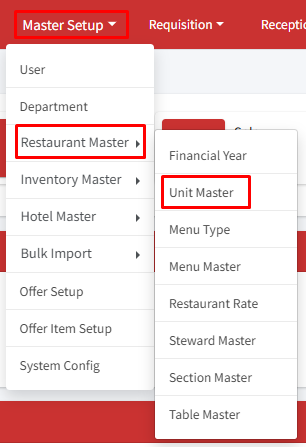
Step 1: Go to Master Setup > Restaurant Master > Unit Master
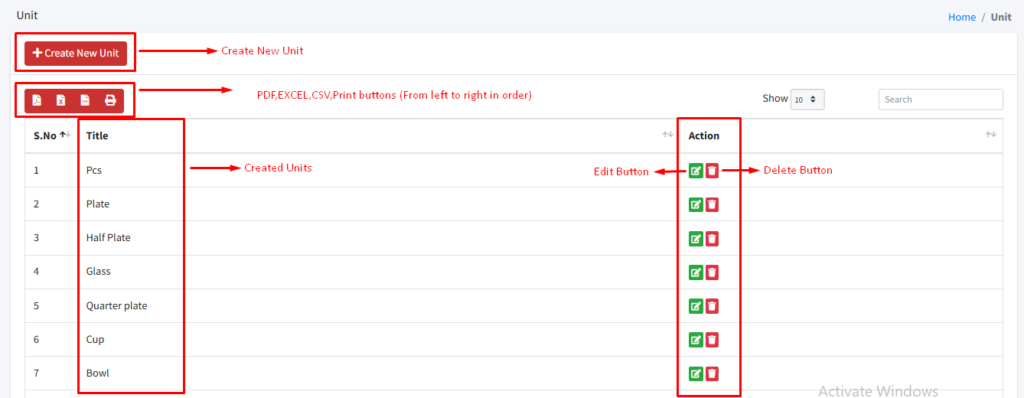
Step 2: Click on ‘+Create New Unit’.
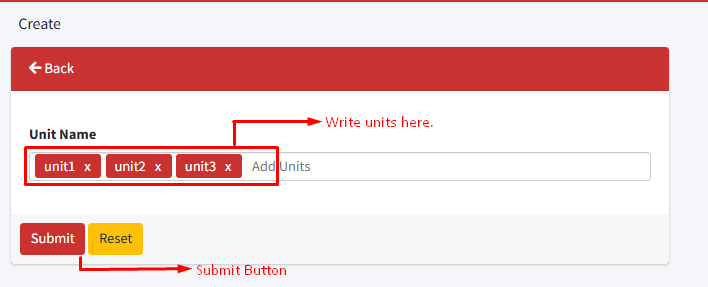
Step 3: Enter the unit name in the ‘Unit Name’ field. You can also enter multiple unit names at once. Press the comma (,) on the keyboard after entering each unit for multiple entries—for example: unit1, unit2, unit3, and so on.
Step 4: Click on the ‘Submit’ Button.
To edit or delete any unit use the ‘Edit’ and ‘Delete’ buttons from the action column.
Note: A unit can not be deleted if it is in use in the ‘Restaurant Rate’ section.
Need help?
Have you any question which is not answered in this knowledge base? Contact us. We are here to help you.