
A financial year (FY) is a 12-month period used for accounting and financial reporting purposes. It’s the timeframe within which businesses and organizations track their income, expenses, and overall financial performance.
Follow the following steps to add the financial year
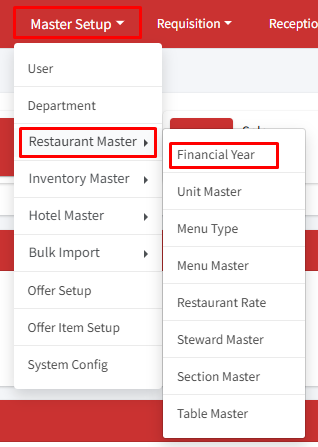
Step 1: Go to Master Setup > Restaurant Master > Financial Year
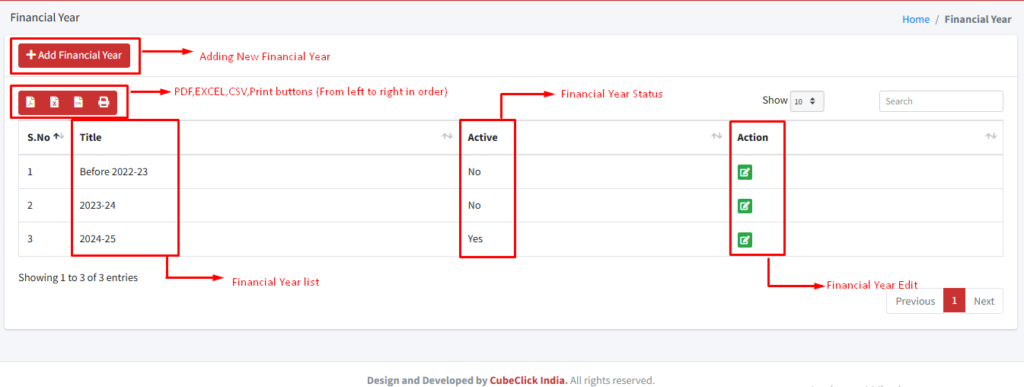
Step 2: Select ‘+ Add Financial Year’ option.
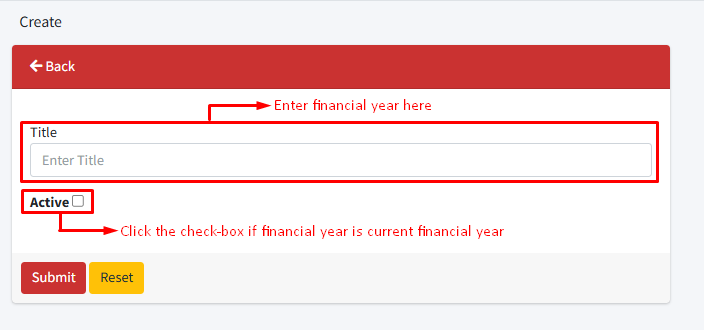
Step 3: Enter your financial year. Example: 2025-2026 or 2025-26.
Step 4: Check the ‘Active’ field if the financial year is the current financial year.
Step 5: Click on the ‘Submit’ Button.
Similarly, you can also edit the financial year using the edit button in the action column.
Need help?
Have you any question which is not answered in this knowledge base? Contact us. We are here to help you.