
Here you can specify the rate of menu items according to units.
Follow the mentioned steps to enter the rate of menu items:
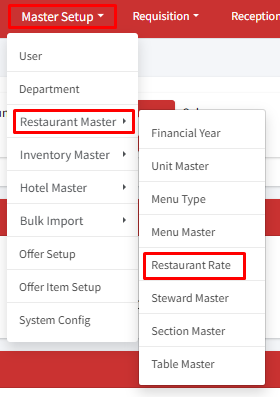
Step 1: Go to Master Setup > Restaurant Master > Restaurant Rate.
Step 2: Click on ‘+Set Restaurant Rate’.
Step 3: On the create page, to set a price for a menu item. First, choose the item you want to price from the menu list. Next, select the unit (like piece, full plate, half plate, etc.) from the drop-down. Enter the price for one unit of that item. Finally, click ‘Submit’ to save the price.
Note: You can set different prices for the same dish depending on the size or portion. For example, Kadhai Paneer can have a ‘Full Plate’ option and a ‘Half Plate’ option with different prices. To do this, you’ll need to enter the price for each size or portion separately.
Need help?
Have you any question which is not answered in this knowledge base? Contact us. We are here to help you.